At work, I use WezTerm to manage my terminal sessions. Its tab + pane implementation is great and being able to configure it with Lua gives us great flexibility. However, when working with OpenCode, I felt some things were missing.
Some paper cuts itched until they were hard to ignore:
- when OpenCode needs my intervention, it was not immediately obvious just by looking at WezTerm
- I forget which tabs have running agents and keep jumping between tabs
I looked into several UIs, like CodeNomad or Conductor (Mac only? Come on…) but I like the speed and ergonomics of WezTerm. After some search I came to herdr, added it to my dotfiles and gave it a go.
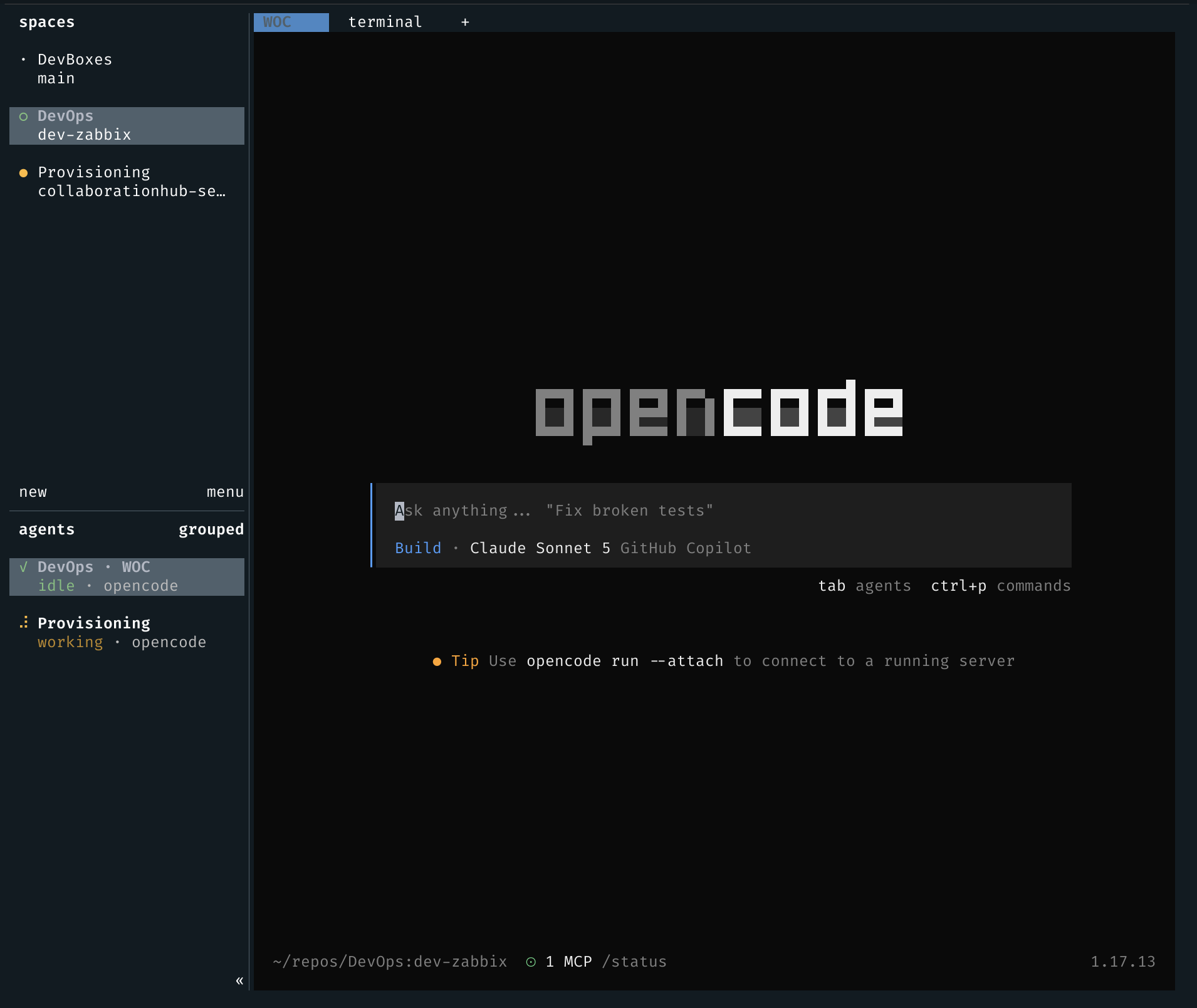
herdr is a terminal multiplexer built for AI agents. It runs a persistent server in the background, gives each agent its own PTY session, and tracks agent state — blocked, working, done, idle — across every pane. That state visibility addresses my main pain point when coordinating several OpenCode sessions across different projects. It’s also aware of a bunch of harnesses, including OpenCode which I still use for work, but also Claude Code and pi which I use in personal projects.
Install
herdr ships as a single Rust binary with no dependencies:
curl -fsSL https://herdr.dev/install.sh | shHomebrew and mise are also supported if you prefer a package manager.
Wire up the OpenCode integration
Install the OpenCode plugin first (make sure you’ve run OpenCode at least once):
herdr integration install opencodeThis writes a plugin to ~/.config/opencode/plugins/herdr-agent-state.js. The plugin lets herdr read OpenCode’s lifecycle state natively, so you get accurate blocked/working/done indicators instead of screen-scraping heuristics. It also enables session restore after a herdr server restart, so your OpenCode sessions come back where you left them.
Start herdr and create a workspace
herdrThis starts the background server if it isn’t already running, then opens the TUI. Keyboard shortcuts use Ctrl+B as a prefix, same as tmux.
Create a workspace for your project:
herdr workspace create --cwd ~/projects/my-app --label my-appOr from the keyboard: Ctrl+B, Shift+N for a new workspace! Or from the UI: just click the new button in the spaces pane!! I really enjoy the ergonomics of these TUIs.
Run your OpenCode sessions
You can create tabs or panes and run harness sessions, terminals, nvim, whatever, just like a normal terminal multiplexer. I mostly work with tabs, having one or several OpenCode tabs and usually a tab for terminals. If I’m teaming with an agent to troubleshoot something, I may split a pane for the terminal in the same tab, but this is rarer.
Split the workspace into panes or tabs and start OpenCode in each:
For tabs:
Ctrl+B, c— new tab, will ask you to name it if you want, otherwise will just assign a number to itCtrl+B, shift+t— rename tab (really helps keeping me organized)Ctrl+B, shift+x— close tab
For pane splits:
Ctrl+B, V— split rightCtrl+B, -— split down
Each pane gets its own terminal. Start opencode in each one as you normally would — herdr picks up the sessions automatically.
Once sessions are running, the spaces pane shows each pane’s state at a glance. A workspace-level indicator rolls up to show the most urgent state. If one session is blocked waiting for your input, the workspace header turns red without you having to check each pane. If the workspace has a harness session started, it will turn green. If running, it will turn yellow. If the agent is done, it will turn blue, and so on.
Switch between workspaces
Ctrl+B, W opens the workspace switcher. If you’re running OpenCode sessions across multiple projects, each in its own workspace, this can help checking in. I do this to see if the agents are getting off-track. However, for short sessions, I mostly let them cook until they require my feedback, either by being blocked or done. The switcher shows the rolled-up agent state per workspace, so you can jump to whatever needs attention first.
Detach and come back later
Press Ctrl+B, Q to detach. Both the herdr server and OpenCode sessions keep running. Reconnect from any terminal:
herdrherdr also natively supports running over SSH, but I haven’t played too much with it. I haven’t found a good way to deal with my use case of having one workspace running remotely in another machine, I have to explore this further.
Session restore
If herdr restarts after a reboot, OpenCode sessions resume automatically. To disable it, set resume_agents_on_restore = false under [session] in the herdr config. If you flip a lot between projects, as I do, having this on can create a ton of workspaces that you rarely use.
I’ve been running three or four OpenCode sessions at a time without losing track of any of them, which I could not do before. The agent state indicators make tracking this easy, turning babysitting into specific check-ins at the moments the agent actually needs me. I’ve tried doing this with WezTerm at work and with ZelliJ at home, but no setup came close to providing this experience.